

10Portfolio
Wirechat — live chat for NodeBB forums
Wirechat is a small live chat for NodeBB 4 forums: a button in the corner of every page opens the conversation, and on phones the panel slides up from the bottom of the screen. On the wirelab forum it is used for quick questions and casual talk alongside the threads.
By the numbers
- Characters per message
- 300
- Days of chat history
- 7
- Automated tests
- 27
Problem
Not every question deserves its own thread. ‘Does anyone know a replacement for this transistor?’ or ‘is the forum down?’ clutter the topic list, and members take such chats to outside messengers. The existing NodeBB shoutboxes are not built for version 4, have no comfortable phone view and no moderation tools, and a chat open to everyone quickly attracts spam.
Approach
I wrote a plugin that runs over NodeBB’s own websocket connection and keeps its data in the NodeBB database, so it needs no separate server. The chat has two views: a dock available on every page (a bottom sheet on phones) and a widget with the three latest messages that can be placed anywhere on the forum. Messages are plain text, and the server turns them into HTML itself: bold, italics, inline code, links, emoji and mentions with a notification. No code from members ever reaches the page. Who may read, write and moderate is set with three privileges in the NodeBB admin panel. To keep spam out, writing requires a confirmed email address, an account older than a day and at least one post, and links can only be sent from rank level two of the rank-badges plugin. There is also a rate limit: five messages per 20 seconds.
Outcome
The chat runs on forum.wirelab.pl under the name ‘Wirechat’, in Polish and English. Moderators delete messages and mute members for 15 minutes, an hour, a day or permanently; everyone in the chat sees the reason, and every decision goes into a log in the admin panel. History covers 7 days or 2,000 messages, so the database does not grow without end. 27 automated tests cover the limits, privileges, mutes and content sanitising. The code is open source under the MIT licence, on npm and GitHub as nodebb-plugin-wirelab-shoutbox.
How it works
01
Dock, sheet and widget
A button in the bottom-right corner opens the chat on every forum page and shows how many new messages there are. On phones the chat slides up from the bottom of the screen. A widget with the three latest messages and the number of people online can go in any NodeBB widget area.
02
A widget that folds away
Since version 1.1.0 the widget can be folded away with the ‘Collapse chat’ button. On large screens, when the chat is the only widget in the column, the column disappears, the topic list takes the full width and a narrow ‘Wirechat’ tab stays at the right edge. Next to other widgets and on phones the chat folds to a single line. The browser remembers the choice and applies it before the page is drawn, so nothing jumps.
03
Mentions, emoji and formatting
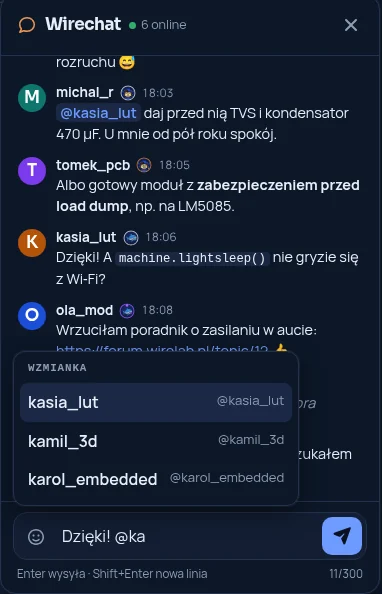
Typing @ brings up a list of matching members, which also works with the arrow keys and Enter. The person mentioned gets a regular NodeBB notification. Emoji, bold, italics, strikethrough, inline code and links all work.
04
Moderation with a log
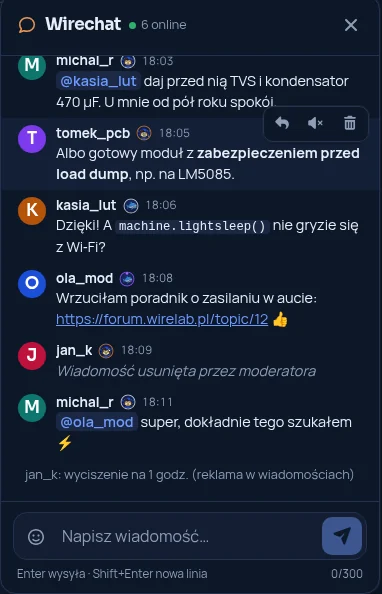
A moderator deletes a message or mutes its author for 15 minutes, an hour, a day or permanently. A reason is required: everyone in the chat sees it, and the entry goes into the log in the admin panel, next to a list of active mutes.
05
Safe content and spam protection
Messages are stored as plain text and turned into HTML on the server, so nobody can put their own code on the page. Only accounts with a confirmed email address, older than a day and with at least one post can write; links unlock only at a higher rank. There is a rate limit, and bare domain names without http count as links too.
06
Keyboard accessible
The message list is a live region for screen readers. Esc closes the chat and returns to the button, Enter sends and Shift+Enter adds a new line. The phone panel keeps focus inside, and animations switch off when reduced motion is set.
07
Code and installation
The plugin is open source under the MIT licence. Code and issues: github.com/nairdaweb/nodebb-plugin-wirelab-shoutbox. npm package: npmjs.com/package/nodebb-plugin-wirelab-shoutbox. You can see it in use on forum.wirelab.pl.