

09Portfolio
Topic icons — icons for NodeBB forum topics
A NodeBB 4 plugin that lets authors pick an icon for their topic: question, guide, problem, announcement and more. It makes the topic list on the wirelab forum readable at a glance, on desktop and on phones.
By the numbers
- Built-in icons
- 8
- Maximum icon size (KB)
- 256
- Automated tests
- 39
Problem
In a forum’s topic list everything looks much the same: a title, the author’s avatar and a few numbers. A beginner’s question, a guide and an announcement are hard to tell apart without reading the titles. NodeBB does let you add a thumbnail to a topic, but then everyone uploads their own picture, so the list quickly looks inconsistent and the administrator has no say in it.
Approach
The icons come from a library the administrator manages: they upload them, name them, set their order and decide which categories they are available in. Eight built-in icons are included to start with. When starting a topic, the author clicks ‘Choose icon’ next to the title, picks an icon from a grid and immediately sees how the topic will look in the list. The administrator decides who may choose icons (everyone, one group or moderators only), and each category can have a default icon. The server checks every choice again, including topics waiting for approval, so nobody can set an icon from outside the category or change it in someone else’s topic. Members cannot upload files of their own, and the administrator’s uploads are checked for type, content and size. The plugin creates no tables of its own, works with every database NodeBB supports, and the topic list needs no extra database queries.
Outcome
Version 1.0.0 runs on forum.wirelab.pl with the wirelab theme, where the icon takes the avatar’s place in the topic list and the author’s avatar becomes a small badge in the corner. With the Harmony theme the icon sits in front of the title. The plugin is translated into Polish and English, and 39 automated tests check, among other things, icon choice, file uploads and caching. The code is open source under the MIT licence, on npm and GitHub as nodebb-plugin-topic-icons. Next on the list are markers on the icon for pinned, locked and solved topics.
How it works
01
Picked while writing
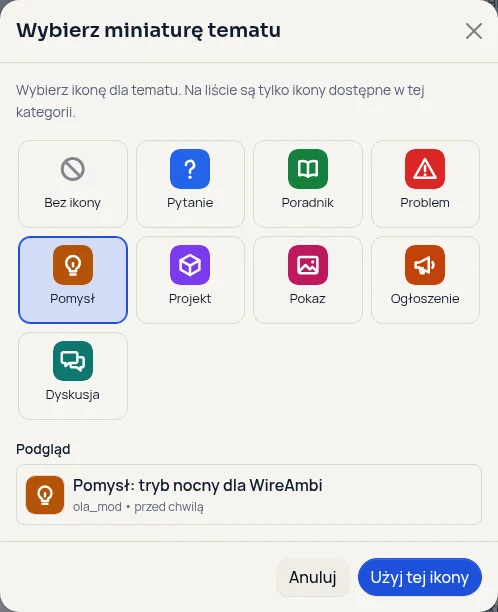
The ‘Choose icon’ button next to the title opens a grid of the icons available in the chosen category, with a preview of the topic row. It works with the keyboard, the choice is kept in the draft, and the icon can be changed later by editing the first post.
02
A library the administrator controls
The administrator uploads icons in PNG, WebP or SVG, renames and reorders them, assigns them to categories, switches them off or removes them. Each category, and the forum as a whole, can have a default icon. A removed icon disappears from the topics that used it, together with its file.
03
Permissions checked on the server
An icon has to exist, be switched on and be available in the category, and the author must be allowed to choose it. Only the topic’s author or a moderator can change it. A topic moved to a category where its icon is not available gets the new category’s default icon.
04
On desktop and on phones
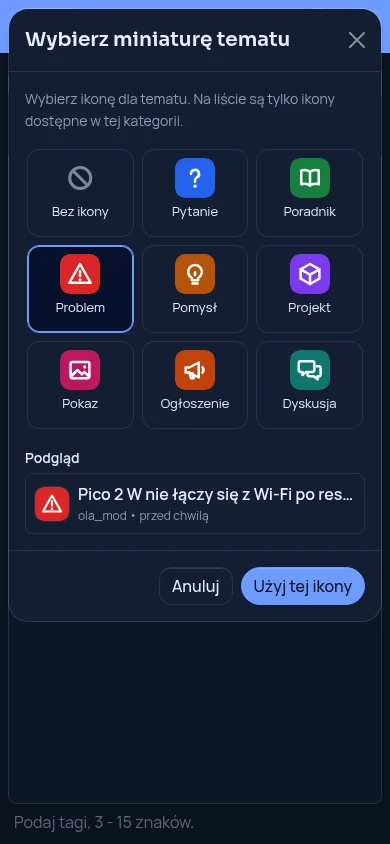
The icon sits next to the title in the topic list and in the topic header, and on a phone the picker fills the screen. The icon’s name goes into the image description in the reader’s language, so screen readers know what it means too.
05
Code and installation
The plugin is open source under the MIT licence. Code and issues: github.com/nairdaweb/nodebb-plugin-topic-icons. npm package: npmjs.com/package/nodebb-plugin-topic-icons. You can see it in use on forum.wirelab.pl.